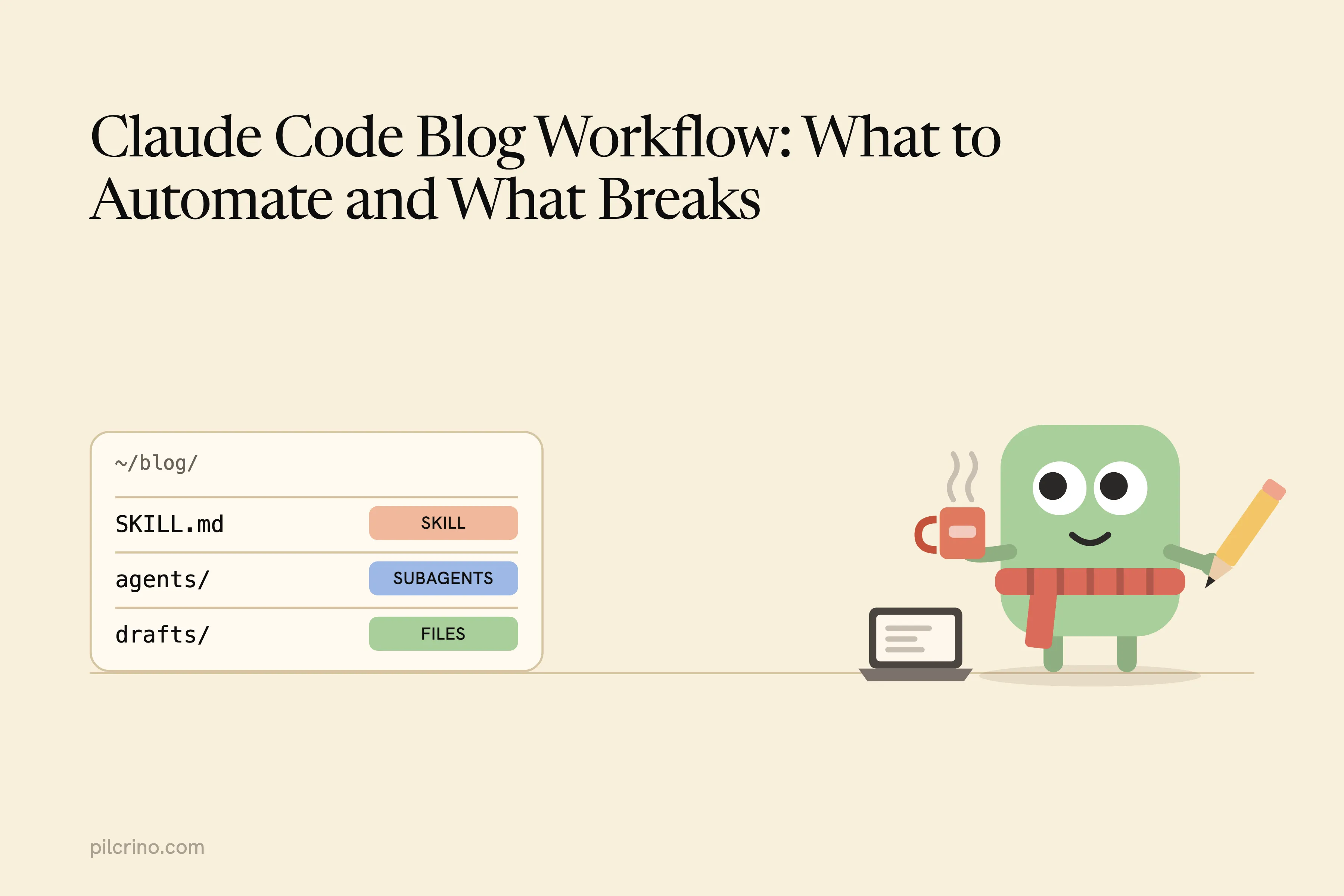
A Claude Code blog workflow that holds up past the first few posts is less about the prompts and more about the plumbing: one skill that runs the stages, subagents that each start with a clean context, research and drafts saved as files, and a pull request you approve at the end. The failures that show up on real runs all come from skipping one of those parts.
I’ve run about 100 posts through a pipeline built from Claude Code skills and subagents, on two live blogs, one on Astro and one on WordPress.
If you want the writing steps themselves (brief, research, plan, draft, review, an edit that strips AI phrasing, images), I covered how to write blog posts with Claude separately. This post is about the machinery that runs them.
It covers what the workflow is made of, the five ways it breaks, what to automate first, and when your own SKILL.md is all you need.
What a Claude Code Blog Workflow Is Made Of
A working setup has five parts. Each one exists to stop a failure you’ll meet in the next section, so it’s worth knowing what each is for before you write a line of it.
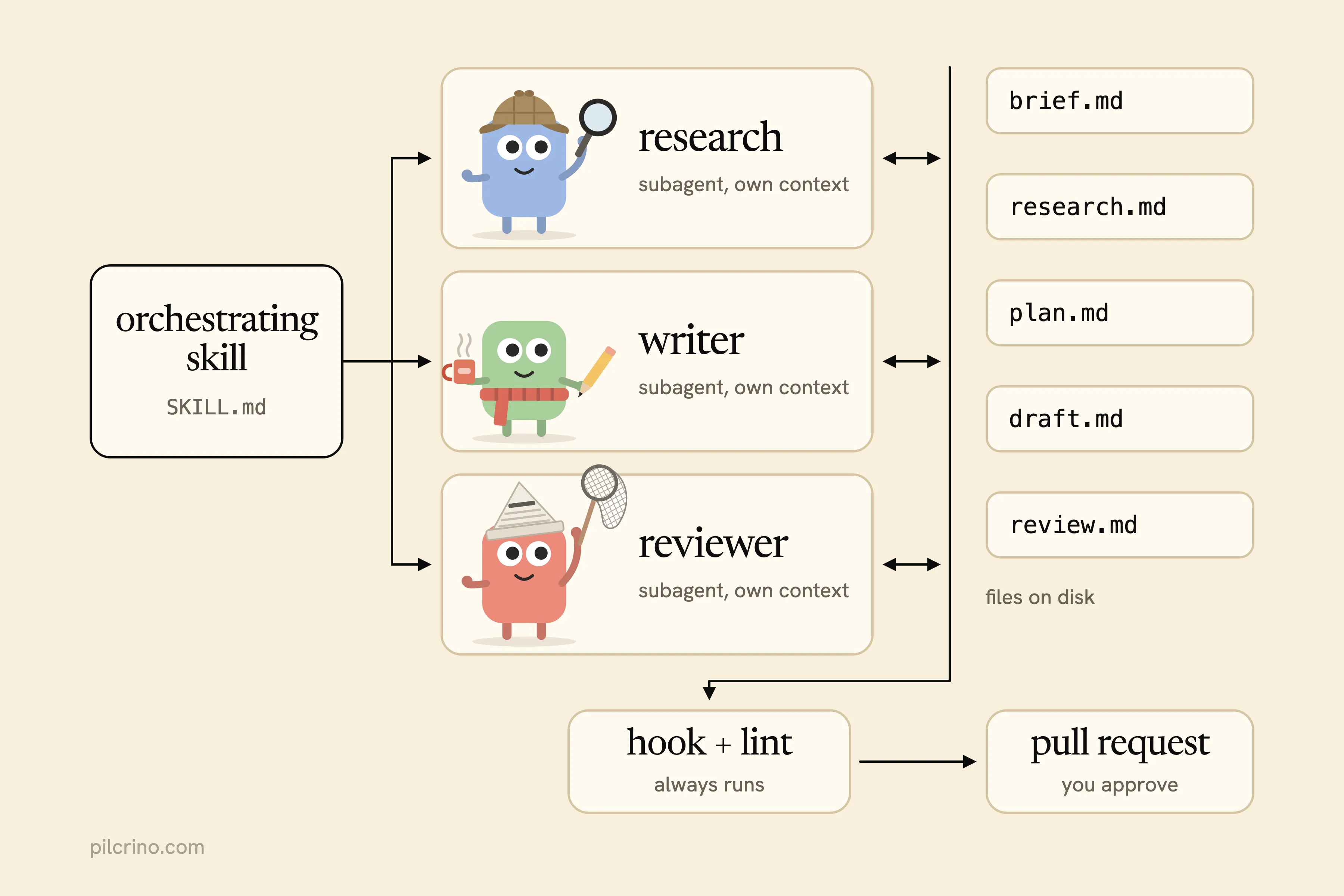
- An orchestrating skill. A skill is a
SKILL.mdfile of instructions that Claude loads when it’s relevant or when you type/skill-name, and its body only loads when it’s used. This one lists the stages in order and what “done” means for each. - Subagents for the heavy reading and writing. A subagent is a separate Claude instance, and each subagent runs in its own context window with its own tools and, if you set it, its own model.
- Files on disk as the state. The brief, research notes, plan, drafts and review are each a file, so every stage reads the last stage’s output instead of the conversation.
- Checks that must always run, as hooks or a linter. A hook is a shell command Claude Code runs at a fixed point in a session, so it runs whether or not the model remembers to.
- A pull request as the review surface. A pull request is a proposed change you read on GitHub before it merges. The run ends there (or in a CMS draft), never in a live post.
Two builders have published their versions. Joe Karlsson, a developer marketing engineer, wrote up a /blog command with two approval checkpoints and a Vale lint that must pass. You type /blog "topic" and it researches, outlines, waits for your approval, drafts, waits again, runs the Vale lint to zero errors, generates images and opens a pull request. He built it so a marketing team no longer had to wait on him as the quality check.
Aaron Held described a lighter setup for his Hugo blog. He plans each article as a to-do list inside Claude Code, has it search his own older posts for context, then lets Claude commit, push and watch the deploy. He still picks the header image himself.
The pipeline I run is built from the same parts: one orchestrating skill, separate research, writing, review, AI-phrasing edit and image agents, and each post’s state kept in files on disk.
So what do the public write-ups leave out?
Both setups work. Both describe the happy path of one run. Neither says what happens on post forty.
What Breaks When It Runs on Real Posts
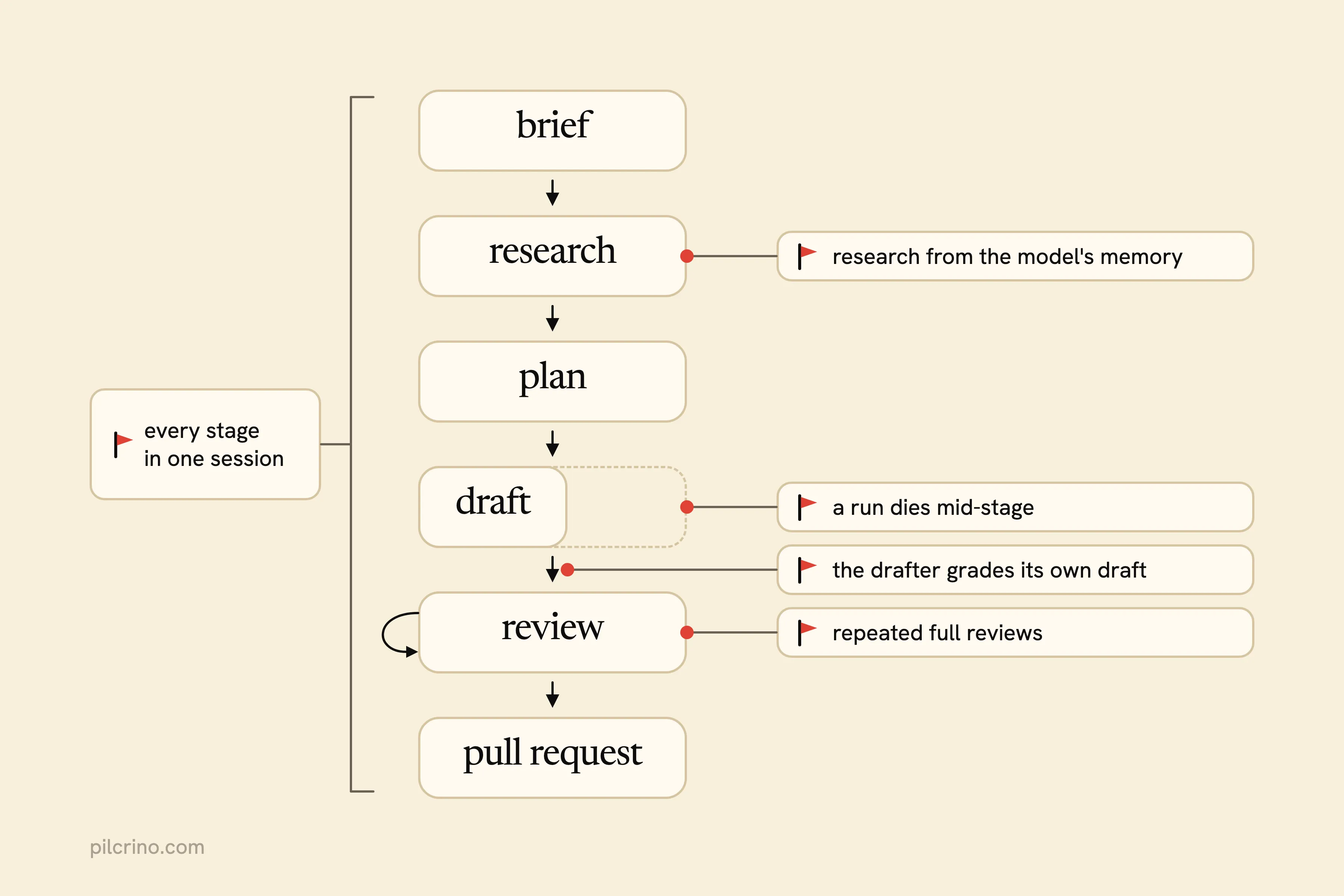
One good run proves the prompts. Forty runs prove the plumbing, and each failure below points at the part that prevents it.
One Session Carries Every Stage
It’s the easy way to start. The research pages, the plan, every draft and every review sit in one conversation, and the later stages get worse.
Back in January 2026, one commenter in an r/ClaudeAI thread of Claude Code tips wrote: “Opus 4.5 in Claude Code still struggles with knowing what to keep vs. what to drop once the context window fills up. So you end up designing around that limitation.”
A bigger window moves the point where that happens. It doesn’t make the choice yours.
The design around it: subagents that each start clean, with files as the hand-off.
Research Comes From the Model’s Memory
The research stage “summarizes” the topic without opening a single page. The draft then carries plausible numbers with no source, and you spend the edit hunting for one.
Held’s setup gets this right on a small scale. Before drafting, Claude searches his own existing posts, so the context comes from text that exists. A model told to research a topic with no pages in front of it has nothing to anchor on except what it remembers.
How do you tell which one you’ve got? Ask the research stage for the URL behind every number. If it can’t give one, it never read a page.
The fix: research captured to files from real pages, with a URL on every claim.
The Drafter Grades Its Own Draft
Ask the session that wrote a draft to review it, and it has every reason to approve. The reviewer shares the drafter’s context, its reading of the brief and every choice it already made, so the mistakes look like decisions.
Pedro Sant’Anna’s open-source Claude Code template for academic research takes a hard line on any check you haven’t tested. A check only counts once it has caught a defect planted on purpose, because “an unqualified check is not weak evidence, it is none.”
A same-session review has never been shown anything. Use a separate reviewer subagent with its own checklist instead.
Reviews Redo Work That Didn’t Change
A review flags a few issues and the writer fixes them. Then the next review rereads everything and re-checks what already passed, and each loop spends the budget again.
Mario Hayashi went looking at his own agent harness (not a blog pipeline) after wasting two weeks’ worth of token allowance in a few days. His audit found three patterns:
- “Reviewing unchanged work again.”
- “Replaying context and repeating checks.”
- “Polishing without a fixed finish line.”
On Pro and Max plans, usage limits are shared across Claude and Claude Code. A review loop that runs all night drains the same pool your daytime chats use.
Cap revisions at two rounds instead, and have each follow-up review check only what changed plus the findings still open.
A Run Dies and Nothing Says Where It Stopped
A usage limit, a closed laptop or a crash ends the run halfway through the draft. The conversation is gone, or too long to pick back up, so you start again from the brief.
Hayashi hit both halves of this. “Turn limits could hit an agent halfway through a task,” he wrote, and worse: “An agent reported done without pushing the changes to complete the task. The system needed to inspect the repository after the agent report.”
At a usage limit, Anthropic lists three options: wait for the reset, enable usage credits, or upgrade. Waiting is fine. Losing the half-finished post isn’t.
The fix: a state file that records the current stage, and a resume that checks the files instead of trusting the agent’s report.
Notice that none of the five is a prompt problem.
What to Automate First, in Order
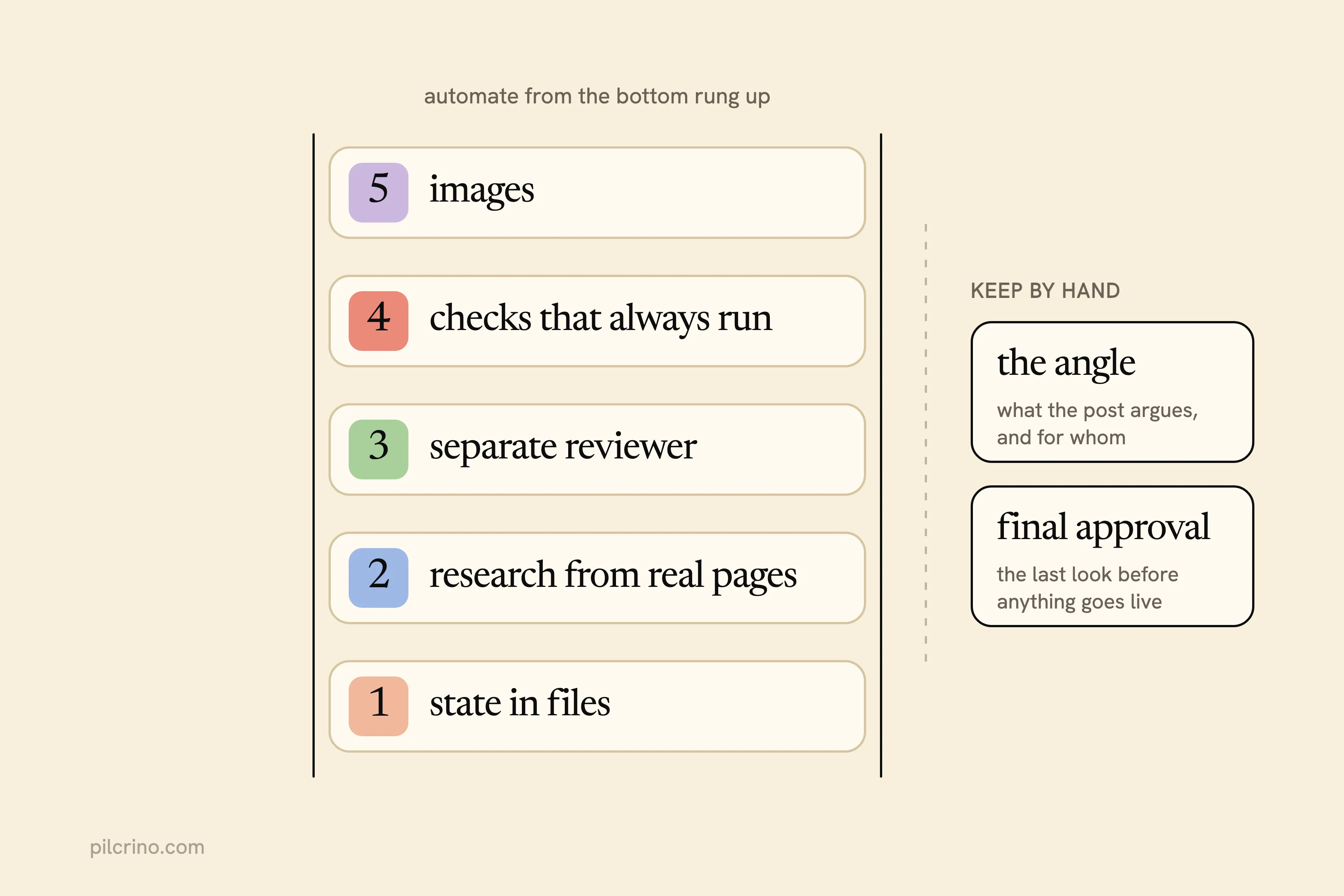
Rank each piece by the failure it removes and how often that failure costs you a whole post. Each step itself is in the seven-step guide; this is the order to wire them up in Claude Code. Two decisions stay with you however far you go: the angle and the final approval.
1. State in Files, So a Run Can Resume
Keep a checklist file that records where the post is. A stage only counts as done once its output sits in a named file, and a resume reads those files to decide where to pick up. The checklist holds:
- the current stage and whether it finished
- the file each finished stage wrote
- the review findings still open
For runs without you, claude -p runs a skill non-interactively (put /skill-name in the prompt) and exits non-zero when the run fails, so a wrapper script can tell a crash from a finish. The --resume flag continues an old session, but that doesn’t help when the session is the thing that got too long. Resume from the files.
It comes first because it turns every other failure from “start over” into “rerun one stage.”
2. Research Captured From Real Pages
Run research as its own subagent with its own tool access: it holds the search, fetch and browser tools and writes what it found to a file. The drafter is a second subagent handed only that file plus the brief, and a claim missing from the file gets flagged.
The drafter never sees the research conversation, so each entry has to stand without it:
- the URL
- the exact sentence or number
- the date it was fetched
This ranks second because invented facts make a post unpublishable, not just weak.
3. A Separate Reviewer, Tested on a Planted Mistake
Make the reviewer a subagent too. In its own context window it reads the draft and plan you pass it, not the conversation that produced them, and its model field can put it on a different model. Hand it your checklist and cap the rewrites.
Before you trust it, plant a mistake, like an invented number or a missing section, and confirm it gets caught. Sant’Anna’s repo makes this a rule: every check has to catch a planted defect before it counts, and it ships a skill that “seeds defects + a clean control, reports recall and false-positive rate.”
The edit that strips AI phrasing comes after review, and I covered why the two stay apart in why AI blog posts sound generic.
The reviewer is where quality comes from. It still ranks third, because it only pays off once the first two give it clean inputs.
4. Checks That Always Run
A model forgets rules on a long run. Code doesn’t. Karlsson’s command won’t open a pull request until Vale passes with zero errors, and Anthropic’s hooks guide describes hooks as deterministic control: the action always happens instead of depending on the model to choose it.
Checks worth taking out of the prompt:
- banned words and phrases
- no em dashes
- every link returns a 200
- required frontmatter fields present (frontmatter is the metadata block at the top of the post file)
- the site builds
Run them as a hook or a lint step, not as a line in the prompt.
5. Images, Last
Images depend on the final prose, so they come after review.
A missing image never stops a good post from publishing, and Held, who hands Claude his whole deploy, still picks the header image by hand. My own pipeline makes product-specific images, and it’s still the stage I’d build last.
What to Keep by Hand
Two decisions stay human:
- The angle. What the post argues, and for whom.
- The final approval. The last look before anything goes live.
Why not automate the approval too?
Because it’s the check a reviewer subagent is worst at: a post that’s accurate and still wrong for your blog. An open-source Claude Code SEO pipeline shared on r/AI_Agents runs headless on a schedule and posts daily, and its builder still offers a semi-automatic mode where “the human has to review and fix/approve the post before it goes live.” Another commenter kept reviewing every topic map by hand because “the tooling loves generating fluff pages.”
Make approval one gate at the end, not five along the way. Karlsson, who built two checkpoints into his own command, names the cost: “approval gates add latency. Too many of them and you’re back to the slow, review-gated world you were trying to escape.”
When a Hand-Built Skill Is Enough
Your own SKILL.md is the better pick when:
- you run one blog
- you publish a post a week or less
- you like maintaining the pipeline
- you’re around when a run stops
Karlsson’s and Held’s write-ups are good places to start. Mine started as a few Claude Code skills I wrote for my own company’s blog.
When does a hand-built Claude Code blog workflow stop being enough?
When you want several posts a week, runs you leave overnight, two sites, or a team that shouldn’t need to read your skill to use it. Resume, limit handling, browser research and a clean approval step then become maintenance you do every week.
Pilcrino is that pipeline packaged as an app on your machine. It researches through your logged-in browser, uses a separate reviewer, stops with the reason instead of guessing, pauses at your plan’s usage limit and resumes when it resets, and publishes nothing until you approve. On a standard Claude plan with the default model mix, it gets through about three posts a day. It’s on a waitlist.
You can build every part above yourself on the plan you already pay for. If you’d rather run the pipeline than maintain it, join the Pilcrino waitlist.
It’s built for posts in your voice that argue for your product. The writer is a free Claude Code plugin; the app that runs it for you is $199 once, $129 for the first 50, with 12 months of updates and support, and is on a waitlist.
Researched and drafted with Pilcrino. Approved by Slav.
FAQ
Do I need Claude Code to automate blog writing with Claude?
No, you can run each step by hand in Claude chat. Claude Code earns its place once you want the stages to run as skills and subagents with nobody at the keyboard, which is what the claude -p command is for. Because claude -p exits non-zero when a run fails, a script can catch the failure and resume from the files the finished stages already wrote.
Can Claude Code publish blog posts on its own?
It can commit, push and open a pull request. Joe Karlsson’s /blog command ends in a pull request, and Aaron Held has Claude push his posts and watch the deploy. The run should still stop at a pull request or CMS draft that you approve, because that last look is the check the pipeline is worst at doing for itself.
Why use subagents in a blog workflow?
Each subagent runs in its own context window, so the heavy reading and drafting stay out of your main conversation and every stage starts clean. You can also set which model each subagent uses.
Does a Claude Code blog workflow use my Claude plan’s usage limits?
Yes. On Pro and Max plans, usage limits are shared across Claude and Claude Code, so a pipeline run and your everyday chats draw from the same pool. Review loops that re-check unchanged work can waste a lot of it. When you hit the limit, you can wait for the reset, enable usage credits, or upgrade.