Most advice on AI writing tools and data privacy stops at the model. A SaaS AI writer adds a second company that keeps your product docs and drafts on its servers, and often a password that can publish straight to your blog.
I’ve run about 100 posts through a writing pipeline on my own machine, publishing to one blog on Astro by pull request (a proposed change I review before it goes live) and saving drafts to another on WordPress, so I’ve had to decide exactly what each tool gets to hold.
That’s the same pipeline behind the steps in how to write blog posts with Claude, and this post is about what it’s allowed to touch.
Here’s who can see your data in each setup, what Claude and ChatGPT say they train on, why the blog password matters more than the training clause, and a checklist for any tool.
Three Parties Can See Your Data, Not Two
Type into Claude or ChatGPT and one company receives your content: the AI provider. Add a SaaS AI writer and a second company sits between you and the model, holding your docs, your drafts and often the keys to your blog.
Here’s where each piece goes in the three setups founders actually choose between.
| Setup | Where docs and drafts are stored | Who receives the prompts | Who holds a password that can publish to your blog |
|---|---|---|---|
| Claude or ChatGPT | The provider, kept per its policy (Anthropic: 30 days, or five years if you allow training) | The provider | Nobody. You paste the post into your blog yourself |
| SaaS AI writer | The vendor’s servers | The vendor, which sends them to a model under its own account | The vendor, once you connect your blog |
| App on your machine | Your machine | Your AI provider, under your own plan | You, on your machine |
So who is the extra party?
It’s the vendor in the middle row. With a SaaS writer, three parties see your content: the vendor, the AI provider and your own site.
Koala Writer, for example, runs GPT-5.6 and Claude inside Koala’s own metered account, not your AI subscription (see the 2026 prices of those metered tools). Outrank connects to WordPress through a plugin token, an API key or an integration, so the access to publish lives with Outrank.
In the bottom row, your docs and drafts live on your machine and in your own GitHub repository, and your credentials stay in your keychain. The AI provider, your repository and your own site see the content; no vendor does.
That row still has a limit. The AI provider receives every prompt you send, wherever the app runs, so its training and retention rules apply in all three setups.
What Claude and ChatGPT Train On, by Plan
The provider layer is the one you can’t avoid. Stanford HAI researchers read 28 policy documents from six US AI developers (Amazon, Anthropic, Google, Meta, Microsoft and OpenAI) and found that all six companies use chat data to train their models by default, and some keep it indefinitely.
Uploaded files count too. “If you share sensitive information in a dialogue with ChatGPT, Gemini, or other frontier models, it may be collected and used for training, even if it’s in a separate file that you uploaded during the conversation,” said Jennifer King, the Stanford HAI fellow who led the study.
Claude
On Claude Free, Pro and Max, training depends on the model training setting in your Privacy Settings. Anthropic set October 8, 2025 as the deadline to choose, and chats are kept five years if you allow training, 30 days if you don’t. The Stanford Report describes the result as training “by default, unless you opt out.”
Deleted conversations aren’t used for future training. The change covers “Claude Free, Pro, and Max plans, including when they use Claude Code from accounts associated with those plans.”
That last line corrects a common belief. One commenter on r/ProductivityApps recommended paid Claude because “It doesnt user your data to train if you are on paid tier.” Pro and Max are paid, and the setting still decides.
Claude for Work, Education, Government and the API work differently. Anthropic says its commercial products aren’t used for training by default. One catch: send thumbs-up or thumbs-down feedback there, and Anthropic stores the whole conversation for up to five years.
ChatGPT
OpenAI says consumer ChatGPT improves “by further training on the conversations people have with it, unless you opt out.” To opt out, turn off “Improve the model for everyone” under Settings → Data Controls.
Two exceptions pull in opposite directions. Temporary Chat isn’t used for training at all. A thumbs-up or thumbs-down, though, can send “the entire conversation associated with that feedback” into training even after you opt out.
ChatGPT Business, ChatGPT Enterprise and the API aren’t trained on by default.
What should you change today?
- In Claude, open Privacy Settings and check the model training setting.
- In ChatGPT, turn off “Improve the model for everyone” and use Temporary Chat for anything with unreleased details.
- Skip the feedback thumbs on any chat that contains your product docs.
What a SaaS AI Writer Adds on Top
A SaaS AI writer is a second data holder. It keeps your uploaded docs, brand material and drafts on its own servers and runs them through a model under its own account, so the Claude or ChatGPT settings you just changed don’t govern that path.
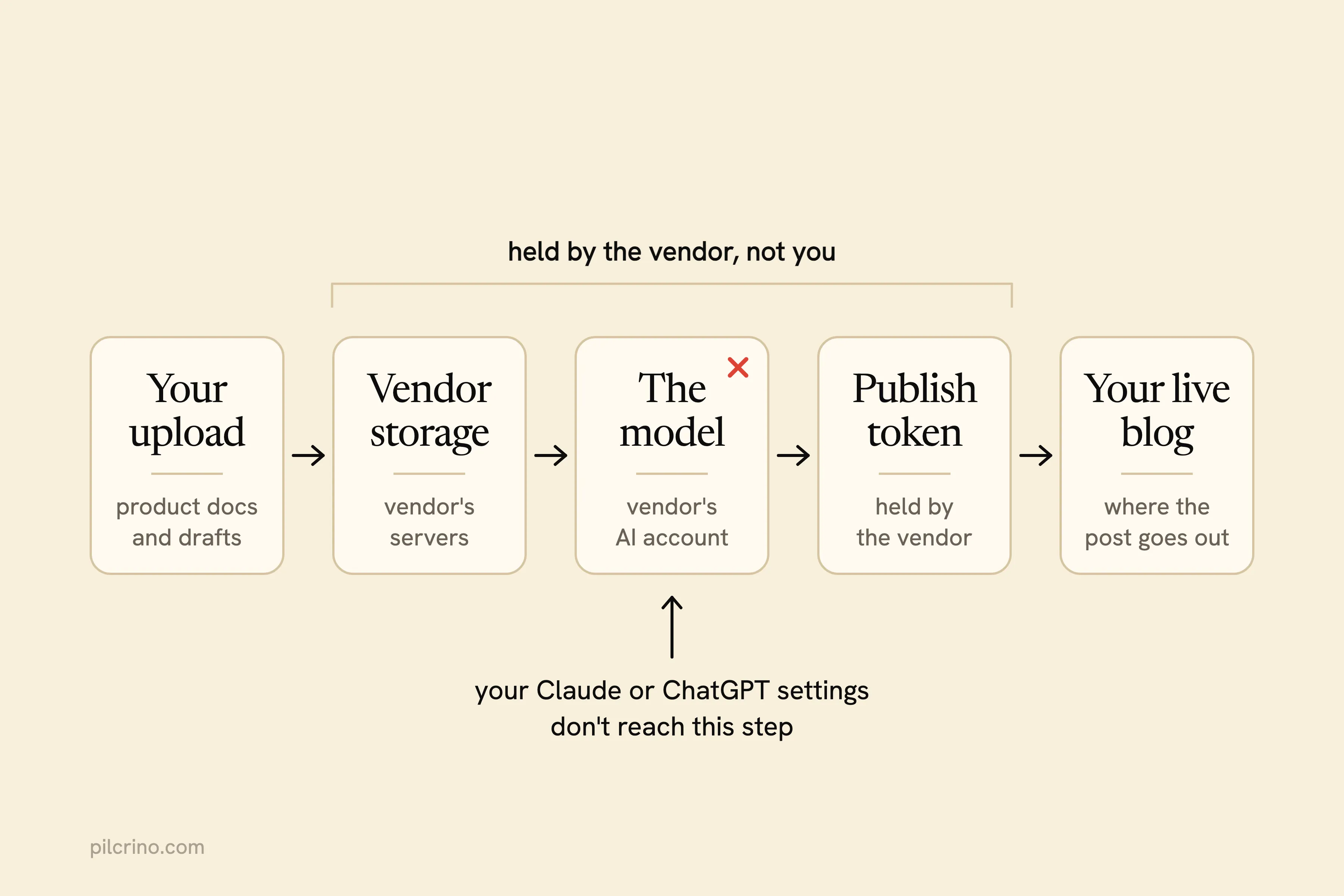
Here’s what the vendor pages say:
- Koala Writer runs GPT-5.6 and Claude inside Koala’s own metered account. The AI plan covering your text is Koala’s, not yours.
- Outrank and Autoblogging.ai don’t name the AI model that writes their articles on the pages I read, so you can’t look up that model’s training policy yourself.
- Jasper is the clearest: “Jasper does not use your data to train AI models, and you keep full ownership of your content.” It also states SOC 2 Type II certification and encrypts customer data at rest with AES-256. If you’re leaving it anyway, here are the alternatives to Jasper compared by who holds your docs.
For Koala Writer, Outrank and Autoblogging.ai, their pricing, feature and integration pages don’t state a retention period or a training policy. That isn’t evidence they train on your content. Read each privacy policy, and if it doesn’t answer, ask. If you’re choosing between them, I compared Koala AI alternatives on pricing and approval too.
Which model is reading your roadmap?
If a vendor can’t answer that in a sentence, you don’t know which policy covers the unreleased features you just pasted in.
The Blog Password Is the Bigger Risk
Training is about what a model might learn from your docs. A credential that can publish is about what a tool can do to your live site today.
On r/marketingagency, u/Brufacee put it plainly: “The biggest practical risk is often not the prompt, it is an over-broad OAuth token attached to an agent with no audit trail.” An OAuth token is the access an app gets when you click “connect” instead of typing a password.
What can a writing tool do with the access you give it?
Here’s how the four vendors describe publishing on their own pages:
- Outrank’s WordPress docs say articles are “automatically published to your WordPress site as soon as they’re generated,” while its homepage FAQ says articles are “first saved as a draft.” The site gives both answers.
- Koala Writer, on its Boost plan and above, has a scheduling feature that “generates and publishes each scheduled article for you” once you approve the plan.
- Autoblogging.ai says “Your credentials are never stored on our servers - just encrypted API tokens,” and those tokens can still publish, including through campaigns that generate and publish content automatically, with no stated default for draft or live.
- Jasper has no WordPress integration, and its Webflow beta runs every publish action through an approval step.
Whichever tool you pick, shrink what its credential can do:
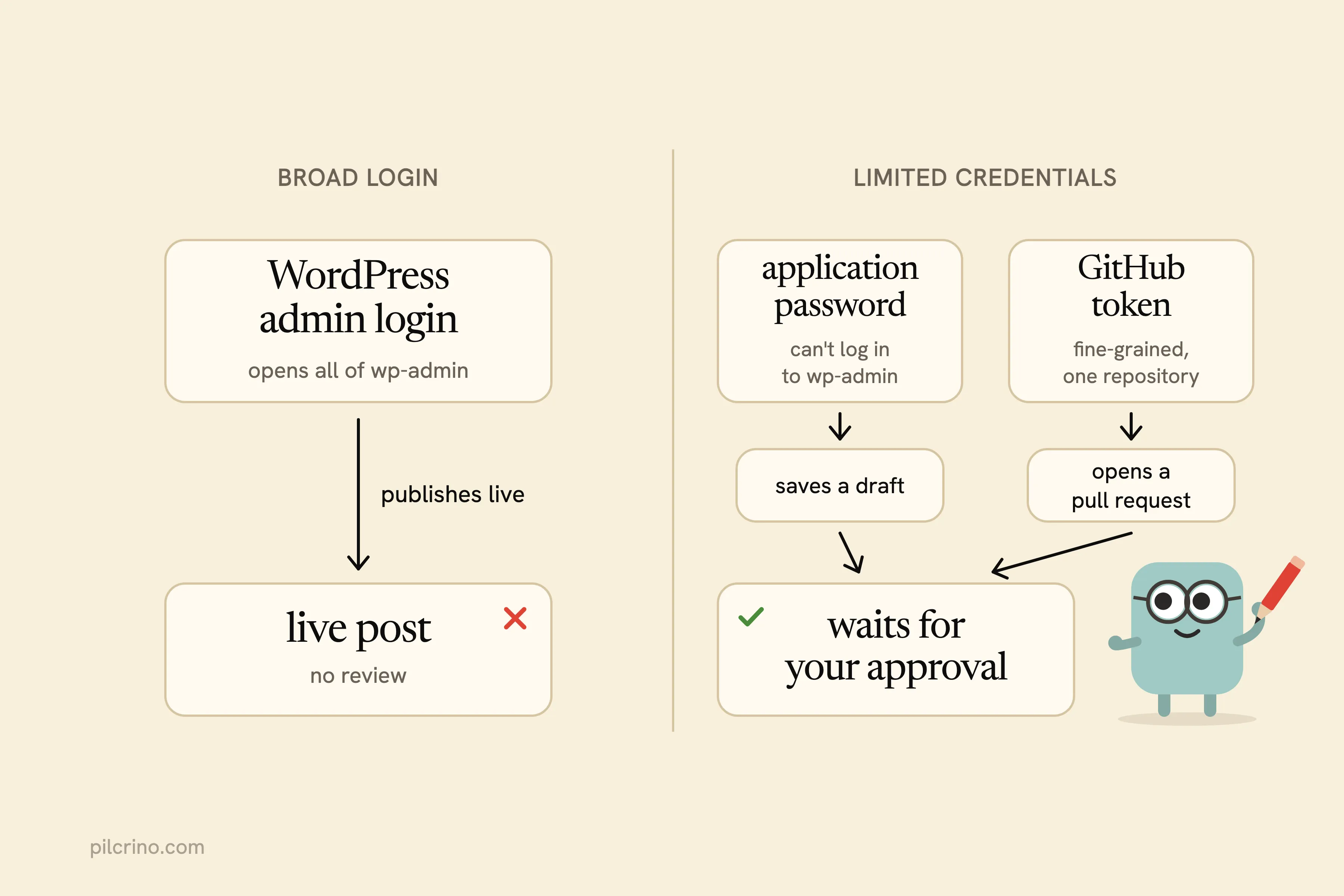
- Give WordPress an application password, not your login. Application passwords have been in core since WordPress 5.6, they can’t be used to log in to wp-admin, and you revoke each one from the Edit User page.
- Give GitHub a fine-grained token. Fine-grained tokens can be limited to specific repositories, so limit yours to the blog’s repository and set an expiration.
- Publish drafts or pull requests, not live posts.
- Keep a human approval step. As u/KatFromSisense wrote on r/analytics: “For anything that could alter data or kick off an action, I’d keep a human in the loop.”
The pipeline I run opens a pull request on the Astro blog and saves a draft on the WordPress one, so nothing goes live until I approve it.
When Raw Claude or ChatGPT Is Enough
For a lot of founders, no extra tool is the most private setup. Raw Claude or ChatGPT covers you when three things are true:
- You turned training off, or you’re on a business or API plan that isn’t trained on by default.
- You paste only the facts a post needs, not your whole docs folder.
- You publish by hand, so no tool holds your blog password.
The escape hatches help too. OpenAI says Temporary Chat isn’t used for training, and Anthropic says a deleted Claude conversation “will not be used for future model training.”
When does that stop being enough?
When you’re feeding the same product docs into a workflow every week and want the result to reach your blog without copying and pasting it yourself.
A Checklist to Audit Any AI Writing Tool
On AI writing tools and data privacy, a training promise is where most privacy pages start and stop. As u/Bubbly-Attention-300 wrote in a thread about private AI writing tools, “‘we don’t train on your data’ is only one line to check.”
Stanford’s researchers recommend “affirmative opt-in for model training, and filtering personal information from chat inputs by default.” All six developers they studied trained by default instead, which is why the opt-in question below is worth asking out loud.
What should a vendor be able to answer in one sentence?
Put these questions to the vendor, or to your own settings:
- Where are my uploaded docs and drafts stored, and in which country?
- How long are they kept after I delete them?
- Does the tool or its model provider train on them, and is that opt-in or opt-out?
- Which AI model and provider process my text, and under which plan: consumer, or business and API?
- Can people at the vendor read my content?
- Which subprocessors (outside companies the vendor passes data to) see it?
- Does the tool hold a credential that can publish, and can it publish without my approval?
- Is that credential limited, like an application password or a fine-grained token, and how do I revoke it?
- What leaves the app as telemetry or backups?
What an App on Your Machine Changes, and What It Doesn’t
An app on your machine that calls the AI plan you already pay for removes the middle row from that first table. Your docs and drafts live on your machine and in your own GitHub repository, your blog credentials stay in your keychain, and the AI provider, that repository and your own site are the only places the content goes.
Does that make it private?
Partly. The provider still receives every prompt, so the Claude and ChatGPT settings above still apply.
Pilcrino is that kind of app. It runs on the Claude plan you already pay for, researches through your logged-in browser, and delivers posts as a pull request, a WordPress draft or a file to paste in. Nothing publishes until you approve it.
Privacy is one reason I keep the pipeline on my machine. The other is voice, and a tool that never reads your own posts is why AI blog posts sound generic.
If you’d rather not hand your product docs and blog password to another company, join the Pilcrino waitlist.
It’s built for posts in your voice that argue for your product. The writer is a free Claude Code plugin; the app that runs it for you is $199 once, $129 for the first 50, with 12 months of updates and support, and is on a waitlist.
Researched and drafted with Pilcrino. Approved by Slav.
FAQ
Does Claude train on my conversations?
On Claude Free, Pro and Max, it depends on the model training setting in your Privacy Settings. If you allow training, Anthropic keeps your chats for five years; if you don’t, it keeps them for 30 days. Claude for Work, Claude for Education, Claude for Government and the API aren’t used for training by default, though sending thumbs-up or thumbs-down feedback stores that conversation for up to five years.
How do I stop ChatGPT from training on my data?
Turn off “Improve the model for everyone” under Settings → Data Controls, or select “Do not train on my content” in OpenAI’s privacy portal. For a one-off sensitive chat, use Temporary Chat, which isn’t used for training. Skip the thumbs-up and thumbs-down buttons on chats you want kept out, because feedback can send the whole conversation into training even after you opt out.
Is it safe to give an AI writing tool my WordPress password?
Never give it your login password. Create an application password instead: WordPress has supported them since version 5.6, they can’t be used to log in to wp-admin, and you can revoke each one from the Edit User page. Prefer a tool that saves posts as drafts, so you approve each one before it goes live.
Do AI writing tools train on the content you give them?
It depends on the vendor and on the model behind it. Jasper states that it does not use your data to train AI models. Koala Writer, Outrank and Autoblogging.ai don’t state one on their pricing, feature and integration pages, so check each privacy policy and ask the vendor directly, using the checklist in this post.
Does an app on my own machine keep my data private?
It keeps your product docs, drafts and blog credentials off a vendor’s servers, so one party drops out. The AI provider still receives your prompts, so its training setting and retention period still matter. Turn training off, or use a business or API plan.